Audio and video transcription
to text with AI
Calls, podcasts, lectures, interviews, and webinars turned into ready-to-use text
in minutes. Try it for free
Trusted by many other partners










How it works
From recording to finished text in three simple steps
Drag in an audio or video file in any format. Or paste a YouTube, Zoom or Google Drive link.
Drag, upload a file, or record
AI recognizes speech, adds punctuation, separates speakers, and creates timestamps. One hour of audio takes about 3 minutes.
Edit the text in your browser, ask AI to create a report, or download the file as PDF, Word, TXT, or SRT subtitles.
I suggest a new metric. Forget MQL and SQL. Let us measure trust velocity...
users already with us
hours transcribed
average user rating
faster work with recordings
Features
Everything you need to work with audio and video
AI creates summaries, key takeaways, and task lists from your transcript on request.
One hour of recording is transcribed in about 3 minutes. No waiting for hours.
English, Spanish, German, French, and 95 more languages with automatic language detection.
AI reports
Summaries, key takeaways, and task lists. AI creates a report from your transcript on request.
AI chat
Ask questions about the transcript. AI finds the right information and answers directly.
Speaker separation
Automatically detect who is speaking. Every line is labeled and timestamped.
I suggest a new metric. Forget MQL and SQL. Let us track trust velocity: time from first click to a paid trial.
It used to take 14 days. Last quarter it was 5 days. By year end, our goal is 2 hours.
Meeting assistant
Record Google Meet, Zoom, or other calls. The assistant transcribes the meeting and prepares notes automatically.


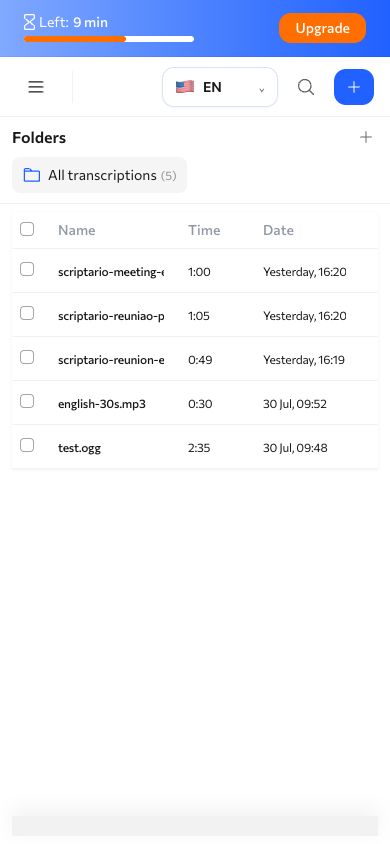
Mobile version
Open Scriptario on your phone to upload recordings, review transcripts, and work with results wherever you are.
Transcription by link
Paste a YouTube, Zoom recording or Google Drive link and we will download and transcribe it automatically.
Periods, commas, and paragraphs are added automatically. The text is ready to read.
MP3, WAV, MP4, MOV, MKV, OGG, M4A, and dozens of others.
Download transcripts as PDF, DOCX, TXT, or SRT subtitles.
Who it is for
Hundreds of teams already save hours every week

Managers and executives
Automatic meeting notes and standup summaries. AI highlights decisions and tasks so you do not have to write everything manually.

Entrepreneurs
Transcribe customer calls, discovery interviews, and negotiations. Keep every important detail in searchable text.

Creators and bloggers
Turn podcasts and videos into posts, articles, and scripts. Generate subtitles so your content works without sound.

Researchers and sociologists
Transcribe in-depth interviews and focus groups in minutes instead of hours. AI reports surface key insights and themes.

Journalists and media
Transcribe interviews and press conferences in a few minutes. Timestamps and speaker labels help you find quotes fast.

Students and teachers
Turn lectures and seminars into ready notes. Search by keyword instead of replaying recordings manually.
Transcribe hours of recordings in minutes
Essential
for regular tasks
over the limit — $0.02/min

Professional
for most tasks
over the limit — $0.02/min
Premium
for high volumes
over the limit — $0.01/min
Reviews
What our users say
I transcribe 3-4 interviews a week. Before Scriptario, a 40-minute call could take an hour and a half to type up. Now I get the text in a couple of minutes and can immediately see who said what. Recognition quality is excellent.

I record lectures and upload them to the service. A few minutes later I get a complete transcript with paragraphs and punctuation. Students receive notes, and I can reuse the material for handouts.

I use Scriptario for meeting minutes and client calls. AI highlights tasks and decisions automatically. It saves 5-6 hours a week on documentation.

Frequently asked questions
Answers to key questions about the service and workflow
Popular Scriptario pages
Audio and video transcription for any task
Try Scriptario
for free
15 free transcription minutes.
No card, no commitment